Tuesday, June 25, 2013

More Pirates, Matey! {Freebie included!}

Disclaimer:  This post contains affiliate links to Amazon.com for your convenience.

During the last two weeks of school, I've been using a pirate theme in my sessions.  The kids have been having lots of fun with it!


Here are some of the books I've been using:

Of all the books, Pirate Pete was probably the favorite of the week!  I bought this book after reading this blog post from Jenna at Speech Room News (the cover is different, but the book looks to be the same).  


This book has pop-out pieces that you insert into a slot to tell your own version of the story!  Here's my son having fun with the book - he's adding a party hat to the girl pirate's head.


There are six pop in the slot pieces per page (I laminated them to make them more sturdy).  My kids each got to pick a different object/page and then they had to "read" the page with their object (e.g., "She had a party hat on her head!").

We played a few games this week too.  I used a variety of activities from some of my favorite SLP bloggers, including some from these packets:


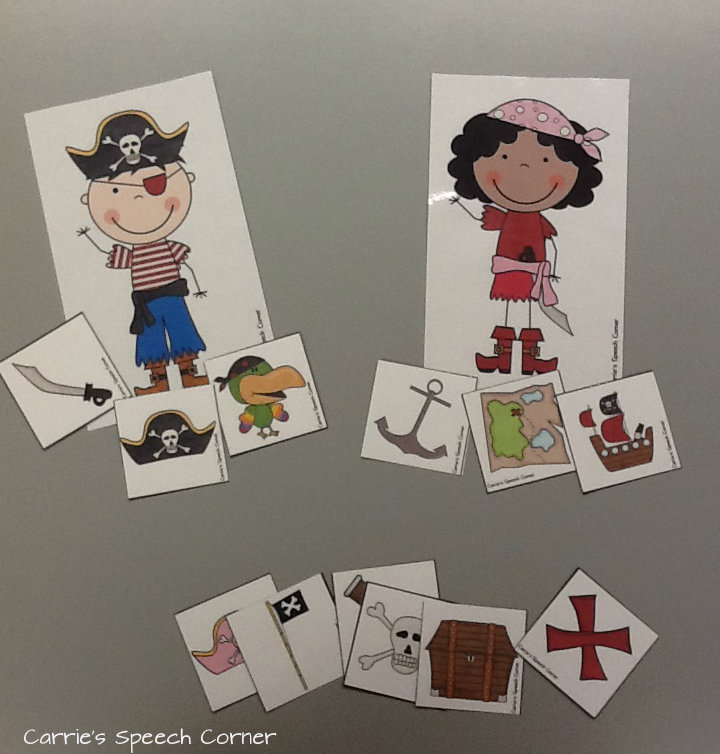
In addition, I created these adorable boy/girl pirates with my Cricut Expression (They're from the Paper Doll Dress Up Cartridge).  I also created some pirate-themed object cards.  We took turns giving objects to the pirates and practicing pronoun use (e.g., "She has the spyglass" or "He has the map").


Don't have a Cricut?  No need to worry!  Here's a printable version of this activity that I created:


You can download this activity HERE.

If you download, leave me a comment!  What are your favorite pirate-themed activities?


Guest Post: Resources for Inferencing {by Kelly of Speech2U}


Today we have a guest post by Kelly H from Speech2U. Kelly has been an ASHA certified Speech Language Pathologist for 15 years. She has worked with children of all ages in clinics, charter schools and in telepractice. She has a passion for incorporating play, movement based and functional activities within my therapy sessions.

One of my favorite skills to work with older children is inferencing.   So I'm really excited (and a little nervous) about my first guest post for Carrie's one year blog-a-versary.  Today, I'd like to share how I teach inferencing and some of my favorite inferencing resources.

I start by telling my clients that we are going to be working on inferencing.  We define inferencing as the ability to look at the information provided and then make a guess about what we think is going to happen.
Inferencing:
  • improves social skills
  • improves reading skills
  • improves language skills 

We talk about HOW LONG a book would be if the author had to write every little thing down.   Usually, we decide we don't want to read a book that is THAT long. When teaching inferences, I'm less concerned about the correct answer and more interested in the PROCESS that the child used to make the inference.  So usually I will have them guess the inference and then circle or TELL me the clues they used to figure out the inference.

Then I have them explain why it couldn't have been a different choice.  In the above example, it couldn't have been a restaurant because the boy went up to the COUNTER to order.  It couldn't have been a Mexican restaurant because he ordered a HAMBURGER.  

I'm always looking for new ways to teach inferences.   Here are some of my Favorite resources or products:  

1.  Super Duper Cards:  Super Duper has sets of actual inferencing cards which are pretty basic.  They also have some of the available as an App.  


2.  No Glamour Inferences by Linguisystems.  I send these worksheets home for home programming.  My favorite section is the section on Object Inferences.  This book also works on Social inferencing which is helpful for many of my clients.  


3.  David Newmonic Inferencing book.   This is my go to resource for Middle school students.  This ebook does a great job of breaking down inferences into pictures, sentences, paragraph level material and then a full text.  The material is more appropriate to older clients.  


4.  Phil Tulga-Inference Riddles online.  This game is played online.  The clues are given one at a time.  You get 10 chances to guess the term.  These are more abstract concepts such as "day."  You can also buy an expanded version of this for 4.95 on his site.

5.  What's in the Bag game on ReadWriteThink.org: I like using this online game with younger clients.  Three words are presented and the student needs to guess what's in the bag.  You can present it with just the clues or click continue to get three color choices.  If you haven't been on Readwritethink.org's website you are missing out. 


6. The Bag Game app by all4mychild ($1.99 on iTunes).  Similar to the game above.  One student selects an item to put in a bag and the others take turns asking questions to figure out what is in the bag.  There are question prompts for kids who have more difficulty.

Do you guys work on inferencing?  If so I'd love to hear your favorite materials or resources. Thanks again Carrie for letting me come over and celebrate!  


Thank you Kelly!  You can follow Kelly on her blog, Speech2U, on Facebook, and on Teachers Pay Teachers.  By the way, Kelly also donated her TPT item Stoplight Emotions for my Facebook giveaways happening this week! Make sure you head over to my Facebook page to join in on the fun!

Monday, June 24, 2013

Facebook Giveaways Night 1 Recap

So I wanted to have some fun with the giveaways on Facebook!  Here's what I did.  First, I took photos of speech and language tests, commercially available speech/language materials, materials from my TPT store, and some app screenshots...then I had lots of fun cropping them and adding filters using Pixlr.  (All the materials - but not tests - have been featured on the blog at one point!)

In case you missed it, here's the recap:

#1. For a copy of Camp Direction Following by Lindsey of Word Nerd Speech Teach, name that book!


And the answer was..."I Love School," guessed by Jenn M.


#2. for Dino Prepositions by Rae's Speech Spot.  Which test is this little guy from?


And the answer was the PLS-5, correctly guessed by Jenna R!


#3.  For a copy of the app, which app is this screenshot from?


The answer...Rainbow Sentences from Mobile Education Store, correctly guessed by Jessica S.


And #4, for your choice of items from my TPT store, which one of my products is this from?


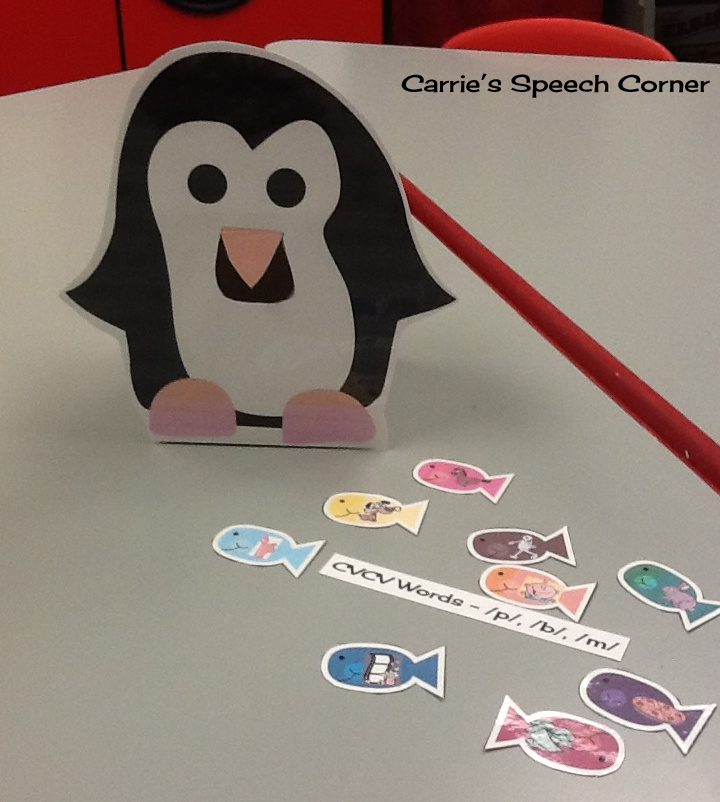
Courtney F. correctly guessed the "Feed the Penguin" series!


If you participated, I hope you had fun!  If not, join me again tomorrow night and we'll do it again!


***These giveaways already happened and winners were announced.  Please do not enter here on the
blog***

App Review: Question Builder

When I first got my iPad in August of 2011, I was so excited!  To get started, I had purchased an iTunes card so that I could add a few apps.  At that time, there weren't nearly as many apps designed for speech and language use on the market as there are today.  This was one of the very first apps I purchased on my very first day of being an iPad user...


Question Builder by Mobile Education Store "is designed to help elementary aged students learn to answer abstract questions and create responses based on inference."  Who doesn't have students on their caseload working on improving their ability to answer questions?  I know I do!

Getting Started:

The first tab along the bottom of the app is the "Info" tab.  Selecting this tab will give you a written description of the app:


When you first open the app, you will be taken to the "Settings" portion.  You will be prompted to enter a new student for data collection purposes.  The app will automatically start up with the last student who used the app.  You can easily change the student or add a new student by tapping "Not You?"


From the settings screen, you will choose the settings you want for each specific child.  You can target questions by specific type (Why, Where, How, What) or include a variety of types (Random).  As with most of Mobile Education Store's apps, there are multiple levels of play.  You can also select color code reinforcement, text reinforcement, and audio reinforcement.  More on all of the settings in just a moment!

Once you have your settings selected, tap "Play" to begin!  Regardless of the settings you have chosen, you will be shown a picture and asked a question.  The student then needs to select the correct answer and tap select. They can also repeat the question if they need to do so.


If the student is incorrect, they will receive verbal feedback (e.g,. "That's not quite right," "You are really trying," etc.).  If correct, they will either receive auditory feedback alone, or receive feedback with a reinforcement cartoon like this car that popped up and danced after the correct response was given:


Now that you have an understanding of the premise of the app, I'm going to go back and talk about the different settings that are available.  First up, Level of Play:


  • In Level 1, the student will be given three possible responses to choose from when selecting their answer.  
  • In Level 2, they are given 4 possible responses.
  • In level 3, they are given 5 possible responses.

Level 2 - 4 possible responses
Color Code Reinforcement:

Notice the red bar along that top that contains the target question?


Turning color code reinforcement off will remove the red bar:

Color code reinforcement removed from a Level 3 question
Deselecting Text Reinforcement will remove the question entirely:


This is a great option when you are working on auditory comprehension tasks and don't want a student to rely on reading the question.

If you have Audio Reinforcement selected, Question Builder will repeat the correct answer (e.g., "That's right.  The beaver ate the tree.").


Stats:
The last tab from the bottom menu (technically the 3rd, but it's the last one I'm talking about) is "Stats."  This is where you will find all of the data collection for your students.  You do not get percentages.  Rather you will be able to see how many correct answers a student got on the first, 2nd, and/or more attempts.  You can fairly easily calculate a percentage by adding up the total.  For example, in the screen below, this student got 70% of Level 1 questions correct on the first attempt and 30% correct on the 2nd attempt.  They got 75% of Level 2 questions correct on the first attempt and 25% on the 2nd attempt.


That's pretty much everything you need to know about Question Builder!  Here's what you should take away...

The Pros:
  • Question Builder allows for multiple levels of play and a variety of supports, so you will be able to use this app for a wide age range of students.
  • The reinforcement cartoons are cute and the kids always want more of them!  ("Can you make the car come back Mrs. Manchester?" -- "Nope. Only you can do that by answering more questions!")
  • I've yet to have a student use this app and tell me they are done before I'm ready for them to be done...meaning that they have been actively engaged and entertained while working on needed language targets!
  • Data collection!  Data collection is always a nice feature in an app and I don't mind that you don't get a percentage.  Like I said, it's fairly easy to calculate.  

Changes I would like to see in an update:
  • Most of my students are non-readers.  It's great that this app reads the questions aloud.  However, there is no option to have the response choices read aloud.  I end up reading the choices myself, which works fine, but it's always nice to have a read aloud option.
  • The data is cumulative...you can't view statistics from different dates.  This makes it difficult to montir progress.  You could jot down your data, reset the stats, and keep a record of a child's progress over time.
The Bottom Line:
Question Builder is a great app for working on a student's ability to answer questions.  The limitations are minimal and easily overcome.  The app has built in reinforcement that increases student motivation.  There are multiple levels and that allows you to use this app with a variety of age ranges.  Question Builder was one of the very first apps I bought when I first got my iPad and it was well worth the price ($5.99 in iTunes)!

Do you use Question Builder?  What is your favorite feature?


I do have a code for this app to give away, but you will have to keep your eyes on the Facebook page for more info!!

Disclaimer:  I was given a code for Question Builder to give away (I purchased my own copy), but the opinions expressed are mine alone. :)

Guest Post: Fluency Tips and Tricks {by Maureen of The Speech Bubble}


Thanks so much to Carrie for including me in her 'Bloggy Birthday' celebration! Congrats!   My name is Maureen Wilson M.S., CCC-SLP and  I am a school-based SLP.  I write the blog, The Speech Bubble :)


Today I want to share some tips and resources that I have found to be helpful when working with students who stutter.  Fluency can be a tricky and complicated area. In the schools, opportunities to work with fluency students can be scattered, making it difficult to gain knowledge and experience. Here are some points  I have picked up that have been helpful to me when working with this group.

Does the student already have diagnosis?
Does the student being brought up for fluency concerns already have a diagnosis of stuttering?  If not, that means that you will need to do some screenings or testing. Remember, RTI can be used with fluency students too!  If the student can read, I like to use the 'Rainbow Passage' as a screening tool.  If they cannot read, picture description is a great way to obtain a speech sample.  Make sure you note any disfluencies, the type of disfluency and length of occurrence, as well as % of stuttering.  A good sample should be at least 100 syllables in length and you should aim to get at least 3 samples.

Does the student receive outside speech therapy for stuttering?
If you receive a request to see a student for fluency, check to see if they are currently seeing an outside speech therapist.  If the parent grants consent, touch base with the outside SLP and collaborate on goals and strategies. Find out what has and hasn't worked for the student.

Observe and Ask
Make time to observe the student in different settings.  I know this can be difficult with our schedules but it really can provide lots of useful information. Watch the child's body language and amount of class participation. Do they play with other students? Answer questions?  Ask the student how they feel about their stuttering. I have had student who truly did not care one bit that they stuttered and others who would be on the verge of tears if you asked them a question.  The student's feelings and perceptions are powerful factors in designing their treatment plan.

Secret Signals

Once your student has begun to master their fluency strategies inside the walls of your speech room helping them transition these skills into the classroom is key.  A strategy that my students have had a lot of success with is using a 'secret signal'.  One of my students compared it to having a personal 'Bat Signal', ha.  You, the teacher, and student create a secret signal that the teacher will use when the student needs a reminder to use their fluency strategies in class. A quick tug on the earlobe has been the best one so far.  It is discrete and gets the message conveyed.

So what materials are out there to help you address your student's fluency goals? Lots!  Here are some of my favorites:


For more information and resources about stuttering check out:


I had done a post awhile ago about a friend of mine who has stuttered his entire life. He shared his experiences and advice on the subject, as well as, some video before and after he attended an intensive fluency program. You can check out that post here.

~ Maureen


First of all, Thank you so much Maureen for sharing this wonderful information!   You can find Maureen's blog, The Speech Bubble, on Facebook.  Make sure you check out her Teachers Pay Teachers Store as well for some fantastic materials!

Second, if you have not seen it, you NEED to check out the video that Maureen posted on her blog.  It's simply amazing and truly inspirational!  


Let the Celebration Begin!


On June 24, 2012 I wrote my very first blog post.  I wanted to start writing posts months sooner, but couldn't come up with a name for the blog (I'm still not crazy about the name, but I'm stuck now, lol!).  Why did I start blogging?  There are a few reasons, but first and foremost, I had found so many great activities online (thanks to Pinterest and Teachers Pay Teachers) and I wanted to give back and share some of my activities.

Over the course of the year, I've met some great people (bloggers and readers!), learned a lot (about blogging, graphics, and copyrights!), and had some fun!  I sincerely hope that you have found some activities that are useful for your caseloads and fun to use because I've sincerely enjoyed sharing with you!

To celebrate my one year bloggy birthday (aka blogaversary), we'll be celebrating here and on the Facebook page all week!  Here's what you can expect:


***Guest Posts***

I will be sharing really terrific Guest Posts from some other
wonderful bloggers this week.  
Be on the look out for posts by:

Maureen of The Speech Bubble
Kelly of Speech2U


***Flash Freebies!***  

I'll post a link to a different flash freebie each night this week on the
Facebook page.
There will also be a special freebie just for Facebook followers for this week only!

***Nightly Giveaways***

These will be happening on the Facebook page.
Giveaways will include app codes and products from my TPT store.  In addition, some of my fabulous blogger friends have donated products of theirs for me to give away.  Here's what I have so far:

Splish, Splash, Splat Book Companion - Kathy of Speech All the Time

And finally, to end the week...

***A BIG Giveaway***

(To enter this giveaway, use the Rafflecopter below.
Winners will be announced Saturday.)

1st Prize: $20 Amazon Gift card, plus every paid item in my TPT store!


2nd Prize:  A Let's Grow Articulation Book of your choice, 
plus every paid item from my TPT store!

Let's Grow Articulation by Katie Pederson, MEd, CCC-SLP 
*choose from "K&G," "F&V," "R," "L," or "S & S blends"

3rd Prize:  5 paid items of your choice from my TPT store!


Pre-K, Kindergarten, First, Second, Third, Fourth, Fifth - TeachersPayTeachers.com


***A Sale***

Every item in my TPT store will be on sale this week (6/24 - 6/28) for 15% off!
(You can access the store by clicking the TPT banner above)


If you're not already following me on Facebook, you'll definitely want to head over and "like" before 8PM EST Monday!  Thank you so much for reading, commenting, liking, downloading, and purchasing!!!  Also, Thank you for helping me celebrate one full year of Carrie's Speech Corner!  You guys are the BEST!!


*A BIG Thank you to the app developers, bloggers, and TPT'ers who have donated items for this giveaway!  Make sure you support them by visiting their blogs and Facebook pages!*

Friday, June 21, 2013

App Review: Phono Learning Center


Hey everyone! Today I'm sharing another super-fun app from Smarty Ears! Phono Learning Center (PLC) is designed to help students who are working on sound production skills. This app is based upon Barbara Hodson's Cycles Approach and was designed for students who are highly unintelligible. The app is designed for use with individual students or groups of students. There are four fun activities to choose from as well!


When you open PLC, you see the menu screen above. If it's your first time, you might want to check out the "support" menu. Here you can read a brief paragraph describing the app, watch a video tutorial, contact Smarty Ears to report a problem, view more Smarty Ears apps, Backup/Restore, and view/share homework pages.


When you're ready to begin, you can start a "new session." Now you will enter your student(s) name(s) and target(s). 


If you can't read them, here is a list of the targets:

Primary Targets: (above)
  • Syllables 
  • Initial Consonants 
  • Final Consonants 
  • S Clusters 
  • Final S Clusters 
  • Posterior Contrasts 
  • Anterior Contrasts 
  • Liquids 

Secondary Targets: (below)
  • Voicing Contrasts 
  • Stridents 
  • Palatals 
  • Consonant Sequences 
  • Medial K 
  • Postvocalic R 

Advanced:
  • Complex Consonants 
  • Multisyllabic Words 
*Advanced targets for students 8 and older. For both secondary and advanced targets incorporate minimal pairs and increasing complexity.


Selecting some of the targets will require you to add more information...


You are able to modify some settings for each individual students. You can turn on/off Auditory Bombardment and select a level of complexity (Words, Phrases, Sentences). You can also add a picture for each player from the camera/photo roll, or select an avatar. There are a ton of avatars to choose from! (The green haired guy was, for whatever reason, a favorite of my male students!).


You can modify the game settings from the "add player" screen as well by tapping the gear button in the upper right hand corner. I think most of the settings (below) are self explanatory, but I would like to point out the "scoring style" options. With "Standard," you can mark a response using "Missed," "Almost," or "Got it." With "Level of Prompts," you can mark a student's response using "Prompted," "Imitated" or "Correct." 


Auditory Bombardment:
If you have this option selected, a student will begin the auditory bombardment activity, but only for individual sessions (this option automatically disables when using in a group). Several balloons float from the bottom to the top of the screen. Students can "pop" the balloons and, each time they do, hear one of their target words. 


Balloon:


In this game, a flash card appears on the left of the screen. The student says the word and drags the card to the balloon. With each card that is brought to the balloon, the balloon inflates a little bit more. Once "full," the balloon takes off! 


Matching:


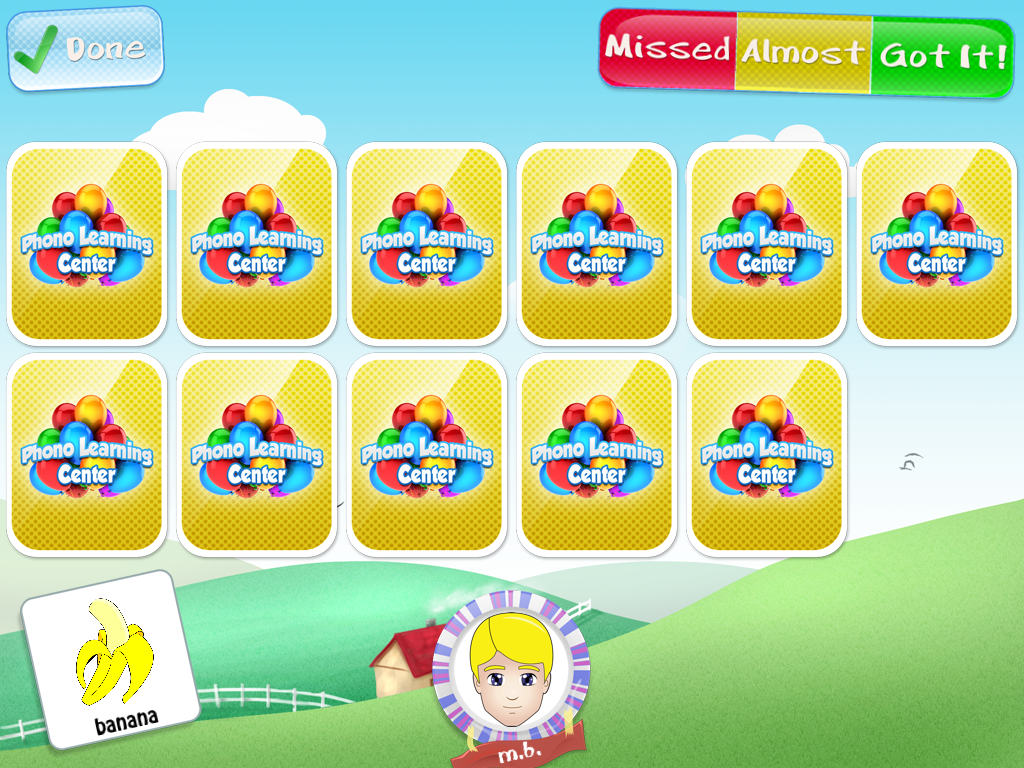
This activity is like a modified "memory" or "concentration" game. Basically, one card is turned over and the child can tap a card that is face-down to find a match. The nice thing about this game is that they can practice the word from each card as they turn them over, allowing for multiple practices. Also, for kids with reduced attention, it limits their focus to finding one card, not two.


Puzzle:


For this game, puzzle pieces with target words appear. Students say their target words and drag to the puzzle area. They do NOT have to line up the pieces to a specific spot in the puzzle frame. With each puzzle piece added, a portion of a picture appears. 


Basket Paper:


This game has been the favorite with all the kids (Matching has been a close second). Students say their word and tap the paper to crumple it. Then they have to flick it toward the basketball hoop. It is possible to miss the hoop in this game, so a few of my groups insisted on keeping score!


Other Features:


Like most of the apps from Smarty Ears, this app has built in capacity to generate reports for your sessions. This is great for monitoring progress over time. PLC is also compatible with Therapy Report Center (TRC), a free app that allows you to store reports from all compatible Smarty Ears apps!

Remember that "Support" icon on the main menu? There's an option there that allows you to generate homework pages! You can email these directly to parents or email to yourself for printing. 


The Pros:
  • This is the only app I'm aware of that targets phonology from the cycles framework, an evidence based approach to treating phonological disorders. 
  • Auditory bombardment - I have yet to see this in an app and it's vital to so many kids with articulation/phonology objectives! 
  • The options available for scoring responses. This app allows you to do more than just identify a response as correct/incorrect. You can also classify by level of prompts needed. 
  • You can use it in a group!!! 
  • The variety/duration of games included. These games play fairly quickly. If you are using this app in a group, you can have each child pick a game for the group or pick their own game. Each child is bound to have a favorite! 
  • Compatibility with TRC! I've said it before, I'll say it again...when it's time to write progress reports, it's so handy having all of your data in one spot! 
  • If you don't want to use the cycles approach, you can turn it off! 

Things I could change in an update:
  • When you finish a puzzle, the "Terminate Session/Switch Game" box appears very quickly and covers the puzzle. I would love it if the box came a little later, was a bit smaller, was moved to a corner...I'm not sure what the best thing to do with the box would be, but I do know that I would like to have a minute or two for the students to look at/describe the picture from the puzzle. 

The Bottom Line:
There are a lot of great articulation apps out there, but not as many that are really geared toward phonology. To the best of my knowlege, this is the only one that targets phonology from the cycles perspective. Phono Learning Center is another fantastic app from Smarty Ears! I love the versatility of this app. You can work on phonological processes or specific speech sounds, modify the way you score responses, and import all of your data into TRC. I also love the games as well. They're motivating and fun for students, and occasionally incite a little competition! 

Phono Learning Center sells for $24.99 in iTunes. PLC is currently on sale for the introductory price of $19.99 but not for long, so hurry up and grab it while it's still on sale!


Related Posts Plugin for WordPress, Blogger...