Tuesday, November 13, 2012

Book of the Week: I Know an Old Lady Who Swallowed a Pie

Thanksgiving is fast approaching!  So, this week's Book of the Week is "I Know an Old Lady Who Swallowed a Pie" by Alison Jackson.  This book is probably my all-time favorite of any of the "Old Lady who Swallowed..." books.  If you're not familiar with it, a granny shows up for Thanksgiving dinner and eats so much, she gets bigger and bigger as the story progresses.  By the end, she winds up being a balloon in the Thanksgiving Day Parade!  (Much more pleasant than projectile vomiting the eaten items, lol!)


"What does she eat?," you may be wondering.  Here's the vocabulary:
  • a pie (a Thanksgiving pie, which was really too dry)
  • cider
  • roll
  • squash
  • salad
  • turkey
  • a pot
  • cake
  • bread

Old Lady eating some pie

As with most of the "Old Lady" stories, I'll be having the students "feed" the old lady.  I have picture cards for the food objects that I got from Mailbox Magazine a few years ago.  I usually try to draw the old lady, but I just couldn't get this one right.  So, I'm using the face from Katie's "Old Lady Who Swallowed a Clover" activity posted on Playing With Words 365 (Yup, she's attached to a tissue box!).  We also work on sequencing the items she ate in order, using sentences ("She ate the ___" or "She is eating the ___"), and answering WH- questions (e.g., "Why did she drink some cider?").

Printable book from Can Do Kinders

There are about a million printables out there for this story!  I'll be sharing just a few of my favorites.  I found this super cute 8-page printable book from Can Do Kinders.  I thought this would be a good follow-up for the story.  Here are some of the pages:

Sample pages from On Thanksgiving Day by Can Do Kinders
You can see by the images above that this book is also great for working on /k/ in mixed word positions.  Target words:  look, cook/cooked, Thanksgiving, turkey, baked, cake.  If you download and print, remember that 1 copy makes 2 books, or else you'll end up with enough for next year (like me)!

Brea at Let's Talk Speech-Language Pathology created another cute printable book that is great for preschool.  Her story is sung to the tune of "The Farmer in the Dell" and it includes the same vocabulary from this story.  Here's a peek:

Sample page from Let's Talk Speech-Language Pathology


Looking for more activities to go along with this book?


Do you use this book in therapy?  What are your favorite activities to accompany the book?


PS, Did you notice that most of the graphics are similar?  Scrappin Doodles has graphic sets for almost all of the Old Lady books!

Monday, November 12, 2012

App Review & Giveaway: Preposition Builder

Today I'm showcasing another app from Kyle over at the Mobile Education Store.  This time, we have Preposition Builder!  


When you open the app, you will need to create a student profile.  I used "Sample Student" as my profile name.  You can add multiple students & collect data for each one.


Once you have created a profile, you are taken back to the "Settings" screen:

"Settings" in the Menu along the bottom

Settings:


  • Audio Instructions:  With this option on, the student will be read the stimulus statement (a fill-in-the blank statement) and preposition options.  They will also be instructed to drag the appropriate preposition to the blank.  If you turn this option off, you will not be prompted with verbal instructions
  • Correct Answer Reinforcement:  The default setting is for correct answer reinforcement.  With this option selected, the narrator will read the completed sentence when the child selects the appropriate preposition.  No reinforcement is provided if you turn this option off. 
  • Record Correct Answer:  You have the option of targeting expressive language by having the student record the completed sentence after they complete the receptive component.  
  • Modules:  Preposition Builder has nine modules, each targeting 3-4 related prepositions.  You must select one module to target during your session.  You cannot select more than one module at a time.  The modules are:
                              1.  In-On-Under
                              2.  Down-Up-Off
                              3.  Above-Below-At-By
                              4.  Behind-Between-Beside
                              5.  Out of-Next to-Away from
                              6.  Toward-Around-Through
                              7.  To-From-At
                              8.  Across-Past-Over
                              9.  With-About-For


Now we'll take a look at the other Menu items along the bottom of the screen:


"Info" Screen
Info:
To the far left is the "Info" tab.  From this tab, you will see a narrative that explains how to use the app and a description of the features.

Play:
We already went over the "Settings."  Next to that is "Play."  Once you have selected your targets from the "Settings" screen, you are ready to play.  Here's an example from the "In-On-Under" module:


I used the app with all of the options turned "on."  So, the narrator read the statement and instructed the student to drag the appropriate preposition to the blank.  If the student selects the correct preposition (in this case "on"), they will hear the completed sentence.  If the student selects an incorrect response, the image will change momentarily to provide a visual representation of that response (e.g., if the student selected "in," they would be shown an image of the boy pouring cereal in the bowl). They would also be given an opportunity to continue until they got the right answer.  

Here are some screenshots from other modules:

With-About-For

Down-Up-Off

Behind-Between-Beside


If you selected "Record Correct Answer," you would be given the option of recording the student response, or moving on to the next sentence.


Once you have recorded a response, you can play the recording, re-record, save the recording, or move on to the next sentence.  To save a recording, just tap "Save Recording" and give it a file name!


Saving a Recording

I found some of the pictures to be challenging.  In fact, I was wrong on a couple of the pictures (I guess I need to work on my prepositions!).  Here's an example:

Behind-Between-Beside
When I first saw this picture, I selected "between."  This seemed like the correct response to me, but I do understand why "behind" is also an appropriate answer.  Pictures like this could open up a discussion regarding why "behind" is a better response than "between."


Stats:


Clicking on "Stats" in the menu along the bottom will give you the data for your session.  You can email yourself the stats as well or reset back to "0."  Notice the "Show my animations"  button?  You may be wondering what this is all about.  Well, Preposition Builder has built-in reinforcement.  As you play each module and provide correct answers, you progress toward unlocking the reinforcement.  Look at the screenshot with the skunks.  See the 2/21 in the corner?  This is not for the purpose of data collection, but showing your progress toward unlocking portions of a story.  

When you select "Show my animations," you will see this screen:


 Notice, you are able to see the opening sequence of the story, but you must play each module and have 21 correct responses/module to see the completed sequence.  The student must select the appropriate response on the first try to move along in their progress toward unlocking pieces of the story.

The end screen of the Opening Sequence

Archive:
This is the last option on the bottom menu.  If you saved any recordings, this is where you will find them.


 That's Preposition Builder in a nutshell!  If you'd like to see a video tutorial, you can do so here.

Strengths:
  • The pictures are engaging and sometimes funny.  You could probably use some of them for other targets.  For example, you could target reasoning skills/providing explanations.  
  • The app targets a variety of prepositions, from basic (up, in) to more complex (between, toward, past).
  • Even if a student selects an incorrect response, that preposition is clarified and reinforced.  
  • The built-in reinforcement of the pirate video encourages students to keep working toward the goal of seeing how the story plays out.
  • I love that I can save the voice recordings and come back to them at a later date.  
  • Data collection, data collection, data collection!  I know I sound like a broken record, but I love apps that allow for data collection! :)
  • In relation to other speech-specific apps, this one is very reasonably priced at $7.99.
Weaknesses:
  • You cannot select more than one module at a time.  It would be nice if you could do so for a child who is working on transfer/carryover.  Perhaps in a future update, if a student unlocks the entire pirate story, they will be allowed to select multiple or all modules.  
  • You cannot use with more than one student at a time.  This means that, when working with groups, you'll be switching users repeatedly.
  • Some of the "incorrect" preposition choices may be "correct" to a student (or to you for that matter) based on geographical/dialectical differences. 
The Bottom Line:
  • Overall, this is a great app for targeting prepositions (receptive and expressive).  You could also use it for developing reasoning skills, providing explanations, and even conversation starters.  The pros definitely outweigh the cons!  If you find yourself targeting prepositions, you may want to consider purchasing this app!  Preposition Builder sells for $7.99 in the iTunes Store.  

Think you can use this app?  Enter to win a copy using the Rafflecopter below.  


Disclaimer:  Although Kyle was kind enough to provide a copy of this app for me to review and another to give away, the options expressed are 100% my own.  

Thursday, November 8, 2012

Newsletter Changes

I've mentioned on the Facebook page that Massachusetts has a new educator evaluation system.  We have a rubric for parent communication, and it seems as though the newsletter I posted back in September is lacking.  The newsletter that I had started sending home is an example of one-way communication and doesn't allow for parent input.  So, after a meeting with some colleagues the other day, this is what I'm going to start doing (Thank you Maureen & Melanie).

You've seen these calendars that I print on the back of my newsletter.  They are from the Moog Center for Deaf Education:


Well, I'm going to have parents check off the activities that they complete with their children.  Each student who completes at least 10 activities will be able to pick a prize from my prize box.  I also added in a box for parent comments/concerns/questions.  Hopefully, this will open the door for 2-way communication!  Instead of going on the back of my newsletter, it will be a second page to make it easier for parents to return.


What works for you in communicating with parents?


Tuesday, November 6, 2012

Book of the Week: Where's Spot?

Last week, Hurricane Sandy hit.  Fortunately, I did not sustain any damage, but did lose power for a few hours.  (If you missed my post on how you TPT sellers can help teachers who lost more than just power, click here).  Between that and Halloween, I never had the chance to post my book of the week last week.  I apologize to those of you who look forward to this.  But, this I'm back with this week's book - "Where's Spot " by Eric Hill.


This is a traditional lift-the-flap book that's great for targeting so many speech/language elements!  Basic premise: Spot didn't eat his dinner so his mother searches for him, but finds many other animals hiding around the house.  I think it's most appropriate for preschool, but the kindergarteners I have worked with in the past loved the book as well.  Some objectives I target with this book:

  • Vocabulary (animal names)
  • Prepositions (in the box, under the bed)
  • Answering Yes/No questions ("Is he under the bed?")
  • Answering WH questions ("Who was under the bed?" Where was the monkey hiding?")
  • Asking questions (I drag out the title to "Where is Spot?" and ask it on each page. Then each page asks "Is he ___?").
  • Concepts (big/little, in/out, under/over, behind/in front)
  • /s/ and /s/ blends:  Spot, snake, s-s-s (snake sound), Sally (Spot's mom)
  • /b/:  box, basket, book, blanket, baby, bag, bear

Here's how I use Spot in therapy:  (PS, this book works well to inclusion groups and small pull-out groups).


First, I gather my materials:


  • The book! (I'm on my 3rd copy of this book - I've been using it since the late 1990's!).  
  • Spot picture (I drew this little Spot dog back in grad school - also late 90's.  Somehow he lasted even though I didn't laminate him until a year or two ago!)
  • Spot doll - I found the plush on Amazon a year or two ago and added him to my collection!
  • Things for Spot to hide in/on/under/behind (I use a basket, a large book, a baby blanket, a box, a bag, and myself)


At the start of the session, I tell the students that I have brought a special friend.  I usually have Spot hiding in the basket and I give the kids clues to see if they can guess who it is:  He's an animal.  He might live in your house.  He likes to play with a ball.  He can bark.  By now (usually), they've figured out that he's a dog.  So, I bring him out and tell the kids that his name is Spot.  Then we all practice saying his name with a good /s/ sound.  Next I tell them that Spot is a little tired, but that, as soon as we're done with his story, he's going to come back and play a game with us.


When I show them the dog (either plush or paper version), I highlight the fact that Spot has ONE spot, I show them the dog on the cover of the book and we count the spots. There are THREE spots on the dog on the cover because that is NOT Spot, but his mother Sally.  This is important, especially for my younger kiddos because, as soon as I open the book and say "Where is Spot?," they say "He's right there!" while pointing at the mom!

I read through the story.  Again, I repeat "Where is Spot?" on each page and encourage the kids to do the same.  After I'm done with the story, I ask WH questions ("Where was the lion hiding?" "Who was in the piano?").  

Now we bring out Spot.  I lay out my materials in front of me (I'm usually doing this lesson on the floor, so I can have a decent amount of space).  I tell the children that Spot's favorite game is Hide & Seek!  So, I have them close their eyes and I hide Spot in different places (in the book, under the book, behind the book, in the box, under the box, etc.).  We work on guessing where he is using appropriate prepositions (e.g., "He's under the blanket" or "I think he's in the box").  Usually the last time around, I hide Spot behind my back to see if they can figure out where he is.  :)

At the end of the game, I tell them that Spot needs another nap, but he'll come back and play with them again on another day (I have a bunch of Spot books, but the two I use consistently are "Where's Spot?" and "Spot Goes to the Farm").  They LOVE this story and the little game!


Plush vs. Paper


*I've been using the Spot drawing for years and the kids have never had a problem with it.  I purchased the plush thinking they would be more engaged.  What I found was that the kids had a MUCH easier time finding him.  Because of this, they enjoyed the game less.  I think that if you are working with significantly delayed children, the plush would be the way to go.  However, if your children are cognitively on target, but lacking in language skills, I'd use the cut-out!

Also, I've found some other Spot resources on-line.  Here are a few:
  • Fun With Spot (Spot's official website)
  • Teacher's Love (printable Spot Worksheets)
  • Kids-n-fun (Spot coloring pages. Great place to find a printable to make your own "flat" Spot!)
  • And finally, here's a YouTube video which shows an animated version of the book:


You can find "Where's Spot?" and the Spot plush on Amazon:


 Have you used "Where's Spot?" or other Spot books in therapy?  What's your favorite Spot book & activity?

Monday, November 5, 2012

App Review and Giveaway: Syntax City

The good folks over at Smarty Ears contacted me recently about reviewing their latest app:  Syntax City!  At first glance, this app reminded me of "The Sims" games.  There is a map that you can navigate and select locations for different objectives.  Without further delay, here is Syntax City!

Getting Started:
When you open up Syntax City for the first time, you are brought to this screen with an introductory letter from the "Mayor" of the city.  From here, you are able to go directly to the game, or watch a video tutorial (approximately 7 and 1/2 minutes long).  I recommend watching the video as it will give you a visual "how to" set up and use the app.

initial start-up screen

In the main menu, you can select "Visit the City" or "Quick Play."  When you "Visit the City," you can add up to five students and collect data.  In "Quick Play" mode, you can still collect data for the session, but it will not save.  Once you select "Visit the City," you will be taken to this screen to add players.  Again, you can add up to five players.

adding new players

Simply tap on "New Player" to add players.  You can add a name and a picture.  For the picture, you can select a photo from your camera roll, add an avatar, or leave it blank.  Here's a sample player badge I created with my son's picture:

player badge

Next, you select the player(s) you want to track during your session.  You can change the settings as well:  

  • Play Audio:  On/Off.  This will change whether or not the question prompt and selected answer will be read aloud to the student.
  • When Wrong:  Remove Item/Buzz.  If a student selects an incorrect answer in the app, you can choose to have the incorrect response removed (so that the correct response is reinforced).  Alternately, you can have a noise play when the student taps an incorrect response.  It doesn't really sound like a buzz, more like a beep or a chime.  It's definitely more pleasant sounding than most audio effects for incorrect answers.
  • Prompt for Voice Recording: On/Off.  This app allows you to record the child saying the completed sentence after they select their response.  Great for expressive language reinforcement.  I have to be honest.  I tried really hard, but I couldn't find a difference when turning this option on or off.  It gave me the option of recording a response in either mode.


settings

Playing the Game:
Once you have selected your players and your settings, you are taken to the map.  The player(s) you selected will appear in the tray at the bottom.  Here, you can drag the players to the places on the map that correspond to the goal(s) you wish to target.  You can also drag a player to multiple locations!
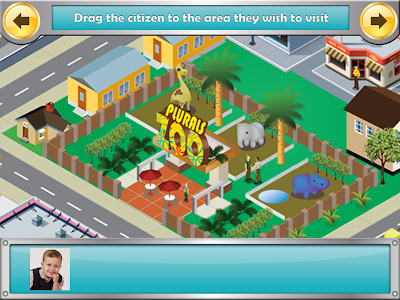

Map of the city

Places on the Map:

  • Plurals Zoo 
  • Was-Were Bakery
  • 3rd Person Singular Beach
  • He-She Ski Resort
  • Do-Does Gym
  • Irregular Past Tense Farm
  • Is-Are Park
  • Have-Has Grocery


I started with the Plurals Zoo.  Many places on the map have multiple levels per target.  You can see here at the Plural Zoo there are three levels:  1.  Regular Plurals, 2.  Irregular Plurals, 3.  Regular & Irregular Plurals. I selected the first option.

Levels of Play in Plurals zoo

The games are essentially the same at each location on the map.  There is a stimulus picture along with a fill-in-the-blank (cloze) sentence.  Below the sentence are options from which to select for the response.  The number of foils may change based on the level.


Plurals Zoo


I forgot to mention that, before you enter a location, you are shown a picture with a rhyming paragraph introduction to that location.  Here's the one for the Irregular Past Tense Farm:

Intro to Irregular Past Tense Farm


In this screenshot you can see that in the Irregular Past Tense Farm the background is different, but the activity is essentially the same:


Irregular Past Tense Farm

Here's a sample from the He-She Ski Resort:

He-She Ski Resort


One nice thing about Syntax City is that the student is given intermittent reinforcements (Treasures) in each location (e.g., Animal Crackers were awarded at the Plural Zoo).

Achieving a Treasure


When you are finished with the session, you can see the treasures collected.  They are displayed on shelves in the student's profile:

Treasure Shelf

Data Collection:
I love apps that have data collection features!  You can see below that this app gives me detailed information on a child's performance during a given session.  You can "Share" the data by emailing it to yourself or to a parent, you can print it (if you have AirPrint), or you can open in iBooks.

Data Report


 Pros:
  • Data collection!  I can't say it enough, I love apps that have built-in data collection!
  • Multiple targets - Syntax City has so many targets that you can work on separately or together.
  • Receptive/Expressive component - The main game play targets receptive knowledge of targets, but recording the responses allows you to target expressive responses as well.
  • Bright and colorful illustrations.  (I can't help but put this as a pro.  I judge books by their covers too!)
  • Use of real photographs in stimulus pictures.  
  • Built-in reinforcement for students.  
Changes I would like to see in an update:
  • When you are using the "Play Audio" function, if you select your response before the audio is finished, it stops.  You can tap the words BEFORE you hit your response to have it repeated, but not after.  I would like to have the option of tapping the completed sentence (after selecting the answer) and having it repeated back as a complete sentence.
  • The data collection is only for receptive responses.  I would like to see a way to track expressive responses as well (e.g., + and - signs that pop up after you stop recording
The Bottom Line:
  • Syntax City is a fantastic app with lots of versatility. You can use it to work on many different objectives and target both receptive and expressive aspects.  The price tag is on the high side ($39.99).  However, most of us wouldn't blink at spending that on a board game targeting syntax.  Smarty Ears offers frequent sales though, follow their Facebook page for sale information!


Think you can use this app in therapy?  Enter for a chance to win a code for your own copy of Syntax City using the Rafflecopter below.

Disclaimer:  Although Smarty Ears provided me with a code for this app review, and another to give away, the opinions expressed in this review are mine alone.

Related Posts Plugin for WordPress, Blogger...