Thursday, April 11, 2013

Don't Throw it Away! Parmesan Cheese Containers


This is kind of a simple one, but I love parmesan cheese containers for storing small objects!  You could use them for sorting bears, stick pegs, lacing beads, etc.


The best thing about using these containers is the lid.  You can use the "sprinkle" part for placing pegs in.


You can use the larger opening for pouring small toys out.


Or you can unscrew the top and use the cap itself to hold the objects.


Do you use parmesan cheese containers?  What do you store in them?


*After posting this to Pinterest, another pinner commented that her daughter, who has a severe milk allergy, broke out when she attempted to use these containers to store toys.  If you have children with severe milk allergies, you may not want to use these containers!

Wednesday, April 10, 2013

App Review: Conversation Builder


Today my co-worker, Stephanie, is going to share her thoughts on Conversation Builder by Mobile Education Store.  Take it away Stephanie!

I am so pleased to have the opportunity to review the Mobile Education Store app, Conversation Builder ($19.99 for iPad in the App Store, $7.99 for the iPhone in the App Store).  If you’re anything like me, teaching social language skills is a tricky area.  Despite my best efforts to portray a range of facial expressions, vocal intonations, sarcasm and humor – most of the time my kids probably just think I’m crazy!  They’re so right!   But, I digress… 

The Conversation Builder app is formatted very similarly to other Mobile Education Store apps, opening right up to the settings page.  All of the important set up information can be accessed very easily.  The first step to getting started would be to input your user information. 


You can manage your user information by selecting from existing users or creating a new user.   


 Now you are ready to modify your settings.  This is where things get interesting!  Since there are soo many different setting options, you are really able to customize the conversations to meet your student’s needs.  The “Conversation Type” allows you to choose:  a 1:1 conversation that lasts for 4 turns, a 1:1 conversation that lasts for 8 turns, or a group format which allows you to pass the iPad around the table and create a conversation between your group members.  


 The next setting option is called “Conversation Initiator.”  This feature allows you to set who will begin each conversation.  There are 3 choices:  your student, peer, or random mode. 

The last group of selections are called “Conversation Modules.”  These are theme based conversations about a variety of topics.  They include:  animals, friends around town, holidays, playground, water play and winter.  There are 20 different conversations, paired with a picture prompt, for each of these modules.  There is also a “Base Conversation Module,” which includes 6 or 7 conversations from each theme, for a total of 40.  Finally, there is a “Randomize” button, which randomly selects conversations from each of the theme modules. 

Now, its time to get talking!  When you press play, you move into the conversation mode.  A picture is presented, along with 3 multiple choice answers at the top.  Depending on the conversation initiator you selected, either a peer will begin speaking or the student will be prompted to think about “What’s the best way to start this conversation.”  Then, by looking at the picture prompt, you can make your selection from the above choices.  When an appropriate answer is chosen, the student is able to record their selection using their own voice.  The app guides you through each conversational turn until it is finished, with the conversation “partner” responding to your student’s comments and questions.  Finally, a box pops up that allows you to play back the entire conversation (using the student’s voice), save or email the conversation.  My student’s thought it was very funny to listen to a “conversation” between themselves and the iPad.  


For those students who could benefit from visual supports, you are able to tap the “History” button at the top of the conversation page.  By enabling this option, the conversation is displayed in text… just like texting would be on a smart phone, with different colors and page orientation for each communication partner.  


The bottom line…

  • Like I said before, anything to make teaching pragmatic language easier is a plus in my book!
  • Customization!!!!  There are lots of options to choose from so that you are able to select the correct starting point for your student, and move up from there. 
  • My kids always LOVE listening to their own voice!  This was no exception.  It puts their own voice right in the conversation with the computer.  Extra giggles on that one…
  • I liked the themed modules.  The themes are such that you could totally use this to practice socializing the whole year ‘round, and have it be relevant to our students. 
  • I would like to see the multiple choice options have a “read” option, so that my non-readers wouldn’t need me to voice the selections. 
  • I think a module for changing the topic of conversation would be great.  That came up a few times and I always answered incorrectly, because there was an appropriate “on topic” answer there as well.  If they were able to make it a “module” I would know when to expect it and explicitly teach my kids to look for it. 


It was awesome to review this app from the Mobile Education Store.  They tackle some difficult topics in their apps, and I have yet to be disappointed.  Keep up the good work!  Although Kyle from Mobile Education Store provided me with a copy of this app (and another to give away) in exchange for my review, the thoughts and opinions above are solely my own. 

Once again, thank you to my good friend Carrie from Carrie’s Speech Corner.  I am grateful for your generosity!  

~Stephanie


a Rafflecopter giveaway

Tuesday, April 9, 2013

Spring Into Speech Blog Hop

Are you excited that it's finally spring?  I know I sure am!  What better way to celebrate the arrival of spring than a Speech Blog Hop?


Seventeen of your favorite SLP bloggers have gotten together.  Each of us will provide you with a freebie and a clue.  Put all 17 clues together, unscramble the phrase, and make sure to visit the last stop on the blog hop.  There you can enter the phrase in the Rafflecopter for a chance to win.  $100 in TPT Gift Certificates will be awarded!!!

1st Place Winner receives a $50 TPT Gift Certificate
2nd Place Winner receives a $30 TPT Gift Certificate
3rd Place Winner receives a $20 TPT Gift Certificate

Here's my Freebie - Rainy Day /r/ Articulation Pack:


You get nine /r/ initial, nine /r/ medial, and nine /r/ final word cards.  Each word is placed on a raindrop.  Here's what they look like:


You also get a page of blank raindrop cards if you wish to add your own words.  I have used these to work on /r/ in carrier phrases.  Lay some articulation cards on the floor.  Have students stand over them and drop the rain cards.  They can say "It's raining on the___" or "It rained on the ___."

You can use the /r/ articulation cards on their own or with the included board game:


You can grab this freebie HERE.  Now back to the blog hop.  Here are your letters for the secret phrase:


Don't forget to collect the others from the rest of the blogs!


 Happy Hopping!


Monday, April 8, 2013

Kid Quotes #2

Today I was working with a group of preschoolers.  We were doing one of the Matt & Molly Stories - "A Frog in a Tree" (from the Animals pack).


If you saw my Facebook post last week, I had this idea to hang a ribbon from my closet door and attach the pictures from the stories with clothespins.  (The story above is "A Rainy Day").

Back to the quote.  In "A Frog in a Tree," Molly is eating ice cream when a frog jumps out of a tree and into her ice cream cone! The story explains that Molly is surprised.  After telling the story, I took the pictures down and had the children place the cards in the correct sequence.  Then I had the kids retell the story.  One boy got up and did a fantastic job for most of the story.  Here's how it played out:


Boy:  Then the frog jumped in the ice cream.  The End!

Me:  How did Molly feel about that?

Boy:  Hungry?

Me:  I think the frog was hungry. (Here I did my absolute best "Home Alone" face) Molly felt...

Boy:  Crazy!


Thanks kid, lol!  He wouldn't be the first to call me crazy or silly, but probably the most memorable!  How was your day today?


Wednesday, April 3, 2013

Book of the Week: Big Wide Mouthed Frog

Did you catch my Articulation Frogs Craftivity posted earlier this week?  (If not, you can find it HERE).


Well, in keeping with the frog theme, my book of the week this week is "The Big Wide-Mouthed Frog" by Ana Martin Larranaga.


In this story, the Big Wide-Mouthed Frog hops off to see the world.  He meets different creatures (a kangaroo, a koala, a possum, an emu, and a crocodile).  He asks the same question to each animal he meets:  "Who are you and what do you eat?"  In the end, he meets a crocodile who, coincidentally, eats big wide-mouthed frogs and the frog quickly hops away.

I made some quick sequencing cards to accompany the book (graphics from Graphics Factory).  You can use just the animals to sequence the story, or use the animals and food for a matching task.  I tend to have my little guys make sentences (e.g., "Kangaroos eat grass"). You can download a copy of the sequencing cards HERE.


To accompany this book, I often do an activity that I posted about a few months ago (HERE).  Essentially, I place different colored shapes inside a hula hoop (you could also use language or articulation cards) and give each student 1-2 hopping frogs (the kind you press down on and they "jump").  The students either make the frogs jump into the "pond" or toss them into the "pond," depending on motor skills.  


Then they need to tell me a sentence about what happened:
  • My frog landed on a blue rectangle
  • My frogs hopped on a red circle and orange triangle
  • The red frog landed on the blue rectangle and the green frog landed on the orange triangle.
  • I got "robot" (articulation card)


What's your favorite frog-themed book/activity?

Tuesday, April 2, 2013

Don't Throw it Away! (Calendars)

I probably should have posted this back in January!  However, on the off chance that you haven't gotten around to throwing out your old calendars, DON'T!  They're another great resource for DIY therapy materials!

Here are some examples from calendars I had:


How cute are these puppies?  Aside from being adorable, check out their faces.  You can use them for describing emotion, describing how you think they would/should feel in different situations (remember, you have 12 pictures!).  You could use them to teach adjectives as well:  sleepy, playful, spotted, etc.


I found the calendar above at the dollar store.  In each picture, some of the friends (a giraffe, bear, duck, and bunny) are pictured doing different actions.  These pictures are great for sentence formulation, describing a scene, describing weather, etc.

Have you re-used calendar pages in therapy?  Tell us about it!


PS, If you have an awesome "Don't Throw it Away" tip that you'd like to share in a guest post, send me an email at cmanchester57@gmail.com

Monday, April 1, 2013

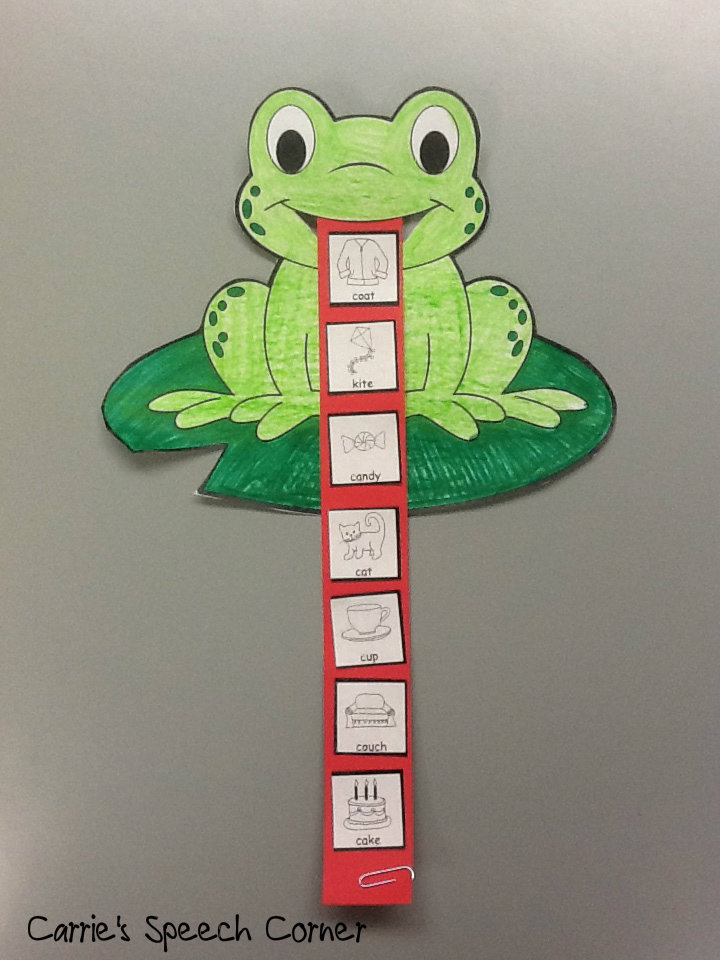
Articulation Frogs ~ A Craftivity

I was flipping through a recent edition of Mailbox Magazine and saw this adorable frog template.  The magazine featured a different activity for the frog, but I thought it would make a great articulation craftivity!


Here's what you need:
  • Frog Template (HERE is a cute one from DLTK kids.com if you don't get Mailbox)
  • Small articulation (or vocabulary) pictures 
  • Red construction paper, cut into strips
  • Scissors
  • Crayons
  • Glue
  • Paper clips (optional)


To create the small articulation pictures, I used Lesson Pix.  If you haven't used Lesson Pix yet, head on over and try it out (you can give it a test run before subscribing, but it's well worth the $36.00/year subscription fee!) Lesson Pix has a sound finder feature, which I used to get target words for my articulation groups.  I created picture cards with the 35 pictures/page option:


I colored the frog and lilypad and cut the frog's mouth out.  Then I attached the strip of paper to the backside of the frog and glued the pictures on his tongue.


You can roll up the frog's tongue and hold it together with a paper clip.  This will give it a curly shape even after you remove the paper clip.  Kids can practice their words as they unroll the frog's tongue.


Other Ways to Use This Craft:

  • Open Ended - You could get some bug stickers and have kids stick the stickers on the frog's tongue for each X number of desired responses (language or artic).
  • Patterning - Use the frog's tongue as a pattern strip (e.g., fly, beetle, fly, beetle)
  • Concepts - Start with a bug in the center of the frog's tongue.  Have students glue more bugs "above" or "below" the first.
  • Sequencing - Find small pictures (or use your photocopier to reduce) of steps of a sequence.  Have students cut out and glue to the frog's tongue in the correct order. I found some frog life cycle sequencing pictures on Enchanted Learning and Making Learning Fun.


What else would you have kids glue to the frog's tongue?  I'd love to hear your ideas!


Related Posts Plugin for WordPress, Blogger...