Showing posts with label pragmatics. Show all posts

Monday, October 27, 2014

What a Character! Conversation Starters for Speech & Language

Oh my goodness! What a busy year this is turning out to be.  I'm not alone in that, right?  I feel as though I barely have time to sit at a computer to get my school paperwork done, never mind create new materials. But, I did get into a creative mood the other night!  I started looking at some clip-art I had purchased a while ago, but never did anything with and here's the result...


I had purchased some fairy tale clip-art from Scrappin' Doodles and thought to myself "What would happen if those fairy tales got mixed together (think the TV show "Once Upon a Time")?  What would their conversations look/sound like?  

Of course, as an SLP, I thought about the pragmatic implications of the conversations, but really there is so much more that could be targeted here! 

*Pragmatic language/Conversation skills
*Perspective Taking
*Grammar/Syntax/Semantics
*Carry-over for articulation, voice, fluency
*Narrative skills

In this free download, there are several mixed-up story conversation starters. Read the situations on the cards and have students discuss how the conversation might continue. You could also discuss the appropriateness of the actions of the characters within each scene. Here's a sample scene:


Head on over to my Teachers Pay Teachers store to download!  Thanks for stopping by!


Wednesday, October 23, 2013

Product Review: Pirate Talk by Super Duper

Oh that red box! Who doesn't love coming home to find one of these at their door?


When the nice folks at Super Duper contacted me about reviewing one of their products, I was happy to do so!  First, I'd be foolish to say no to an awesome product from Super Duper (yes I knew it would be awesome before even opening the box!). Second, I love getting new materials for my kids.  Third, I know many of you look to bloggers like me to find how what we really think of products and apps!  Here's what was in the box:


The Details:

Pirate Talk: Receptive & Expressive Language Game.
Created by: Sarah Michaels and the Super Duper Staff.
Grade Level: K-5
Description (from Super Duper's website):  Your students are about to embark on a swashbuckling adventure as they sail the high seas with Pirate Talk, the receptive and expressive language skills game! As students respond to each prompt, they move from island to island on the colorful game board and collect gold coins. The prompts reinforce seven essential communication skills:  Sentence Repetition, Answering Questions, Following Directions, Categorizing, Inferencing, Describing, and Social Skills.
Includes:  Game Board, 150 Color-Coded Receptive and Expressive Language Cards(5 subject areas, 30 cards each), Instruction Sheet, 6 Pirate Player Pieces, 100 Gold Coins, and Electronic Spinner (1–3)


A Closer Look:

My son has learned that a box at the door equals something fun.  So when we came home, he begged me to open this one right away!  We opened the box, took out the game board, and checked out the other items:

Notice M's foot anxiously waiting to play!
I skimmed the directions because I prefer games that allow you to fly by the seat of your pants.  I believe that if the directions are too long and complicated, the kids won't want to play the game.  Am I right?  Anywhoo...you can see that the game comes with basic directions and game variations!  This is great for changing things up and using the same materials for multiple sessions, but in new and exciting ways!


After that, I organized the cards.  I think it's a personality requirement for SLPs to love organization and clearly Super Duper is a company of SLPs! The box has a tray that holds your cards and the cards come color coded and with dividers:


The cards have different scenes on the front.  The scenes depict scenarios from 5 different categories:  activities, community, home, school, and people.  Here's a sample card from the "activities" section:


Super Duper really does have great illustrations, don't they?  On the back of each card are the prompts for each target area: Sentence Repetition, Answering Questions, Following Directions, Categorizing, Inferencing, Describing, and Social Skills. I found that we could use the pictures as conversation starters as well.

Notice that some cards allow children to earn "bonus" coins!

Instead of dice, Pirate Talk comes with an electronic game spinner! How cool is this?!? I love that you only have the option of spinning a 1, 2, or 3 and I may just have to use this with other games as well!  The kids loved pushing a button instead of rolling a game die and NOTHING fell on the floor!! :)


What may just be the best part of this game is that it comes with 100 gold coins! I didn't count them, I'm going to take Super Duper's word for it!  Boys and girls were thrilled to play this game and to earn these shiny coins!


Trying it Out:

My son was in love with the game and didn't really want me to bring it to work.  Once he got over that, I brought it to school and tried it out with my kids.  I used it with kids in Preschool and in Second Grade.  We played the traditional version, nothing fancy.  The kids LOVED it! I loved that I could use it in a mixed group and target different objectives with the same cards!  I did find that with larger groups of kids, we weren't able to "finish" the game by returning our pirates back to their home bases, but none of the kids minded. They were happy to count their coins to find the winner.  If you're wondering, 2nd grade loved it as much as the preschoolers.


Bonus Activity:

My super-observant friend Stephanie was quick to make this observation...There are 100 gold coins. New information suggests aiming for 100 articulation trials/session.  See where I'm going with this?  You can use the coins for motivation in an Articulation Challenge!


I made a quick "bank" out of a butter tub, but how much fun would it be to use a treasure chest piggy bank!?!?


The Take-Away:

Pros:

  • As a receptive/expressive language game, Pirate Talk has it all.  You can look at a picture scene and ask each type of question, in addition to targeting inferencing and pragmatics.
  • Versatility!  The game cards themselves make Pirate Talk versatile, but the adaptability of the game goes beyond that. (See description below)
  • Fun! Who doesn't love a pirate theme?!?
  • The description on the box says that this game is for Grades K-5, but the box itself says that you can use it with Grades K and up or Ages 4-10.  

Cons:

  • I can't think of a single one!


The Bottom Line:
Pirate talk is a fun, engaging addition to your therapy supply closet.  According to the game's description, you can use it to target 7 areas of communication. However, I have found that you can use it for so much more than that!  The game board can be used for an open-ended activity, the spinner can be used to make your game boards (like those from TPT) more fun, and the gold coins can be used to get 100 trials during Articulation Burst therapy!

If you have Pirate Talk, what's your favorite game variation?  If not, what's your favorite product from Super Duper?


Wednesday, April 10, 2013

App Review: Conversation Builder


Today my co-worker, Stephanie, is going to share her thoughts on Conversation Builder by Mobile Education Store.  Take it away Stephanie!

I am so pleased to have the opportunity to review the Mobile Education Store app, Conversation Builder ($19.99 for iPad in the App Store, $7.99 for the iPhone in the App Store).  If you’re anything like me, teaching social language skills is a tricky area.  Despite my best efforts to portray a range of facial expressions, vocal intonations, sarcasm and humor – most of the time my kids probably just think I’m crazy!  They’re so right!   But, I digress… 

The Conversation Builder app is formatted very similarly to other Mobile Education Store apps, opening right up to the settings page.  All of the important set up information can be accessed very easily.  The first step to getting started would be to input your user information. 


You can manage your user information by selecting from existing users or creating a new user.   


 Now you are ready to modify your settings.  This is where things get interesting!  Since there are soo many different setting options, you are really able to customize the conversations to meet your student’s needs.  The “Conversation Type” allows you to choose:  a 1:1 conversation that lasts for 4 turns, a 1:1 conversation that lasts for 8 turns, or a group format which allows you to pass the iPad around the table and create a conversation between your group members.  


 The next setting option is called “Conversation Initiator.”  This feature allows you to set who will begin each conversation.  There are 3 choices:  your student, peer, or random mode. 

The last group of selections are called “Conversation Modules.”  These are theme based conversations about a variety of topics.  They include:  animals, friends around town, holidays, playground, water play and winter.  There are 20 different conversations, paired with a picture prompt, for each of these modules.  There is also a “Base Conversation Module,” which includes 6 or 7 conversations from each theme, for a total of 40.  Finally, there is a “Randomize” button, which randomly selects conversations from each of the theme modules. 

Now, its time to get talking!  When you press play, you move into the conversation mode.  A picture is presented, along with 3 multiple choice answers at the top.  Depending on the conversation initiator you selected, either a peer will begin speaking or the student will be prompted to think about “What’s the best way to start this conversation.”  Then, by looking at the picture prompt, you can make your selection from the above choices.  When an appropriate answer is chosen, the student is able to record their selection using their own voice.  The app guides you through each conversational turn until it is finished, with the conversation “partner” responding to your student’s comments and questions.  Finally, a box pops up that allows you to play back the entire conversation (using the student’s voice), save or email the conversation.  My student’s thought it was very funny to listen to a “conversation” between themselves and the iPad.  


For those students who could benefit from visual supports, you are able to tap the “History” button at the top of the conversation page.  By enabling this option, the conversation is displayed in text… just like texting would be on a smart phone, with different colors and page orientation for each communication partner.  


The bottom line…

  • Like I said before, anything to make teaching pragmatic language easier is a plus in my book!
  • Customization!!!!  There are lots of options to choose from so that you are able to select the correct starting point for your student, and move up from there. 
  • My kids always LOVE listening to their own voice!  This was no exception.  It puts their own voice right in the conversation with the computer.  Extra giggles on that one…
  • I liked the themed modules.  The themes are such that you could totally use this to practice socializing the whole year ‘round, and have it be relevant to our students. 
  • I would like to see the multiple choice options have a “read” option, so that my non-readers wouldn’t need me to voice the selections. 
  • I think a module for changing the topic of conversation would be great.  That came up a few times and I always answered incorrectly, because there was an appropriate “on topic” answer there as well.  If they were able to make it a “module” I would know when to expect it and explicitly teach my kids to look for it. 


It was awesome to review this app from the Mobile Education Store.  They tackle some difficult topics in their apps, and I have yet to be disappointed.  Keep up the good work!  Although Kyle from Mobile Education Store provided me with a copy of this app (and another to give away) in exchange for my review, the thoughts and opinions above are solely my own. 

Once again, thank you to my good friend Carrie from Carrie’s Speech Corner.  I am grateful for your generosity!  

~Stephanie


a Rafflecopter giveaway

Wednesday, January 9, 2013

Book of the Week: Thomas' Snowsuit

About this time last year, a co-worker of mine introduced me to the book "Thomas' Snowsuit" by Robert Munsch and Michael Martchenco (Thank you Ana!).  This book is hilarious!!  I can pretty much guarantee that the kids will love it, but I will add this warning:  Do NOT read this book to kids that are prone to giggle fits when underwear is mentioned! ;)
I have searched Amazon and bookstores on and off for about a year and hadn't been able to find a copy.  I did find it on Amazon in the "Annikins" version, which apparently is tiny (always read the reviews before you buy something!!!).  A few weeks ago, it showed up in my Amazon recommendations as a Kindle book!  I bought it immediately!  Here's the link to the Kindle Edition and the Paperback Edition on Amazon (again, I don't know if the Paperback edition is "real" sized or the very small edition...the reviews say that it's tiny, the dimensions say 8x8).
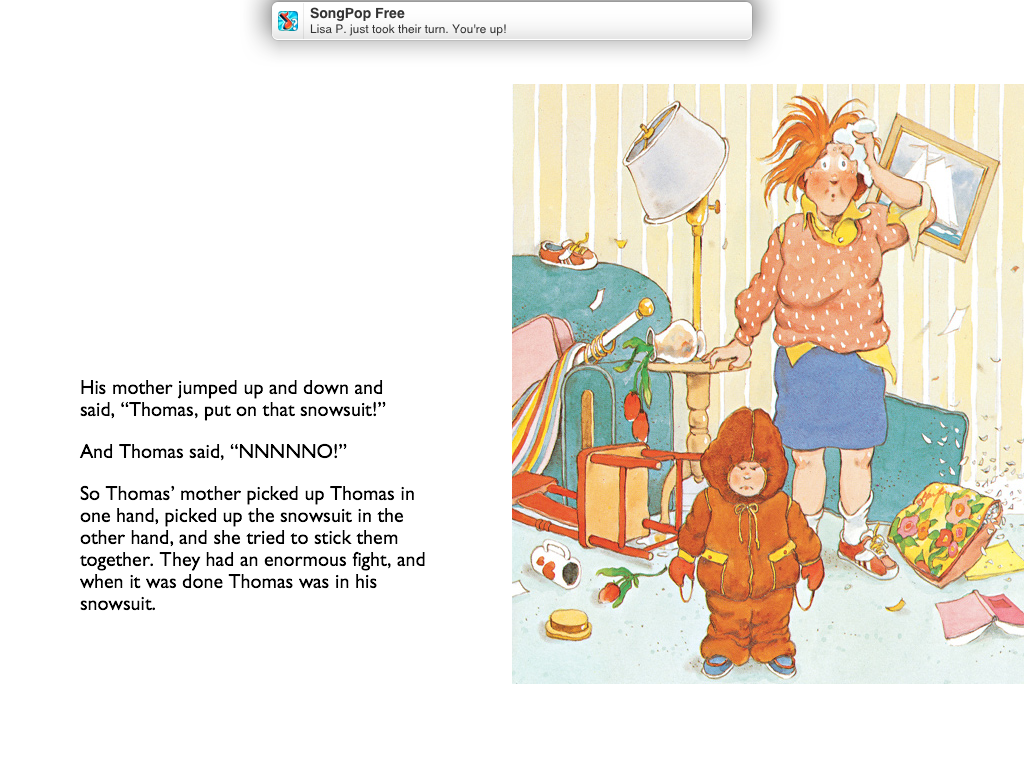
Back to the story...Thomas has a new snowsuit, but he doesn't like it.  He is super dramatic, the illustrations are pretty funny, and I think it's relatable to kids who live in areas that get snow.  Pay attention to the facial expressions in the screenshots ...you can use them with kids who have social deficits for identifying emotion.

screenshot - I probably should have retaken w/o the SongPop notification!

As you can see, Thomas puts up a huge stink putting on his snowsuit for his mother, his teacher, and the principal, but quickly puts on his snowsuit when one of his classmates calls for him to come outside.  Throughout the story, the characters end up swapping clothing in the "enormous fights" that occur.  Prepare for the giggles!

Around the same time that I was introduced to this book, I was also introduced to Speech Room News.  The first of Jenna's awesome activities that I saw was this one:


Jenna had her students sort articulation words by sound position in her version (read the full post here).  I loved the idea, but didn't have kids who would be able to do this.  So, I adapted the activity for one of my language goals.  First, I summarized Thomas' Snowsuit.  Then I printed my sentences on yellow paper and cut into strips.  I had the kids sort story events:  Did that event happen in the beginning/middle/end of the story?


As much as the kids loved the story, they were super excited to play the French Fry Game.  They actually requested playing this game again with other stories!  I ended up doing one story a month with this activity and it was always a hit!  Want a copy of my story summary?  You can download it HERE.

Some tips:  Get clean containers from McDonald's.  If you go in to ask for them and tell them you're a teacher, they will most likely give them to you.  Get the medium sized.  These are the large ones and they're a little too big...you can't see some of the strips and you probably wouldn't be able to see a popsicle stick if you do Jenna's version.

Have you seen this story before?  What do you think?

Saturday, December 29, 2012

"How Does David Feel?" Pragmatic Language FREEBIE

While making an articulation activity, I found this image on Graphics Factory:


I noticed that they offered a few other emotion images with a similar look.  I decided to use them to create a pragmatic language activity - "How Does David Feel?"  I named this guy David because he reminded me a little bit of the boy in "No, David!"  by David Shannon.  Ok, the people in the graphics are not all the same, but I kept the name David throughout. 

Here's what you get...There are two pages of emotion/physical state cards (6 cards/page for a total of 12):

page 1

page 2

Then there are three pages of scenarios (4/page for a total of 12):


Use the emotion/physical state cards on pages 2 & 3 to teach the emotions/feelings. Ask your students to brainstorm scenarios that would cause them to experience the emotions.  Once they are able to identify the emotions, you can move on to the second part.  Read the scenarios on pages 4-6. Ask students to identify how the boy (David) would feel in each situation.  There may be more than one correct response per card. Two children may have different reactions to the same situation.  Because of this, you may wish to expand on the activity by asking why David would feel that way.

Hope you like it!  You can download this freebie HERE.  If you do, please leave me a comment and let me know what you think!


Thursday, December 6, 2012

App Review & Giveaway: Conversation Builder Teen


When Kyle at Mobile Education Store contacted me about their newest release, Conversation Builder Teen, I knew it would be a hit!  He asked me to review it, but since I don't work with teens, I asked Kyle if he would agree to let one of my co-workers use the app and write the review.  He was kind enough to agree.  

This review is written by Jennifer Malloy, MS, CCC-SLP.  Jenn splits her time between an elementary and middle school in my district.  Take it away Jenn!


Carrie was kind enough to let me trial an app on the iPad that is designed for the population of students I work with at the Middle School. The app is called Conversation Builder Teen. I was very excited to trial this app because I already use other “Builder” apps from the Mobile Education Store (Story Builder, Language Builder and Sentence Builder) This app did not disappoint.


The first thing the app prompts you to do is create a user profile. I chose “Miss” seeing as this is what most of the students call me. You can select the conversation type with the choices being 2 or 3 players or Group.
The app allows you to select specific topics of conversation you would like to use. The choices included are: clothes, bullying, summer, entertainment, sports, sarcasm, relationships* and school. Or you can play all of the conversation choices at random.

 *Some topics are sensitive and may not be appropriate for all students, such as sex and pregnancy. In order to select these topics a password must be used to unlock the setting.

2 or 3 Player Mode:


This screenshot above shows the format the app uses when in 2 or 3 player mode. A field of choices is used to aid the students when formulating conversation. This picture depicts a situation in which the student must provide the best response to their friend who is beginning a conversation by stating, “I’m so mad at my parents.” Students select the BEST response to the question and are then able to record themselves saying the chosen response. Once all of the responses are recorded, the students are able to listen to the conversation in its entirety. 

Group Mode:


The above picture coincides with the group player setting. The students in the group are able to have a conversation with each other without prompts from the app.  Again, the students are recorded and can listen to the playback after the conversation is complete.

Therapeutic Applications: 

I work at a middle school and treat students ranging from 10-14, with varied speech and language targets. I found that this app was flexible enough to target a variety of IEP goals for every student I treated throughout the day:

Articulation This app is excellent for working on the carryover of articulation skills to the conversation level.  Students record their statements into the app in order to have a mock conversation.  They can listen to the recordings and monitor their productions.
Fluency  Students with fluency goals utilized speech strategies (e.g., easy onset, pull out) while using this app. The fact that the app allows for students to record their own utterances improved self-awareness of disfluent moments and strategies that helped to improve fluency.
Pragmatic  Students with goals addressing pragmatic language skills also benefited from this app. The students were given a field of three responses to each open-ended question or comment from the app. The students were able to see other responses that could work, however, not all were the BEST choice for the situation.
Expressive/Receptive Language This one is a no brainer! Students are cued to answer questions appropriately and utilize appropriate grammar and syntax in their responses.

The Bottom Line:

Every student I used this app with had a great time! I was having such a positive response from the students while utilizing this app that the other speech therapist I worked with asked what we were doing. I showed her the app and we collaborated groups for the rest of the day. It is VERY hard to find something this age group enjoys doing, targets a variety of speech and language goals and, most importantly, is cool!  I highly recommend this app!

~Jenn

See Conversation Teen Builder in action: click here to see a short video tutorial.  Conversation Builder Teen sells for $29.99 in the App Store.  Enter to win a copy using the Rafflecopter below!

Disclaimer:  Mobile Education Store provided a copy of Conversation Builder Teen for the purposes of this review and giveaway.  However, opinions expressed are those of the SLP who provided the review.


Related Posts Plugin for WordPress, Blogger...